To add new custom functionality to Nemo,
do so by copying (NOT creating symlinked) executable scripts (doesn't matter what type, as long its executable) to the directory ~/.local/share/nemo/scripts.
Once done, the script should be executable from the right-click context menu.
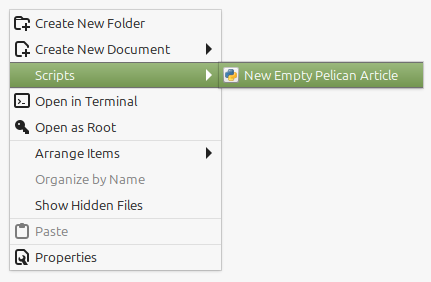
If one or multiple files are selected, these are provided to the registered scrips as positional CLI arguments. If multiple are selected however, it seems to autosort them alphabetically by filename, so keep that in mind.
Extras to registered scripts
The following environment variables will be set by Nemo, which the scripts may use:
NEMO_SCRIPT_SELECTED_FILE_PATHS: newline-delimited paths for selected files (only if local)NEMO_SCRIPT_SELECTED_URIS: newline-delimited URIs for selected filesNEMO_SCRIPT_CURRENT_URI: URI for current locationNEMO_SCRIPT_WINDOW_GEOMETRY: position and size of current windowNEMO_SCRIPT_NEXT_PANE_SELECTED_FILE_PATHS: newline-delimited paths for selected files in the inactive pane of a split-view window (only if local)NEMO_SCRIPT_NEXT_PANE_SELECTED_URIS: newline-delimited URIs for selected files in the inactive pane of a split-view windowNEMO_SCRIPT_NEXT_PANE_CURRENT_URI: URI for current location in the inactive pane of a split-view window