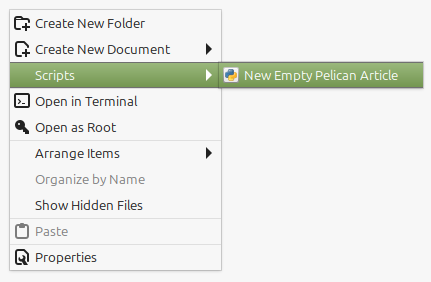
To add new custom functionality to Nemo, do so by copying (NOT creating symlinked) executable scripts (doesn't matter what type, as long its executable) to the directory ~/.local/share/nemo/scripts.
Once done, the script should be executable from the right-click context menu.
Let's just say i was trying to learn how to better use ffmpeg, and started asking myself "What are the things i needed when working with video content?".
Let's say i was looking for a way to convert images into a format, that is perfectly suited for modern webhosting. That means, good compatibility, decent enough quality and (most important) low file size.
The classics are .jpg and .png, which are also the best supported, and are good enough …
Let's just say i was trying to learn how to better use ffmpeg, and started asking myself "What are the things i needed when working with video content?".
And this is one of the things that came to mind. A simple way to extract a clip from an starting point …
Let's just say i was trying to learn how to better use ffmpeg, and started asking myself "What are the things i needed when working with video content?".
And this is one of the things that came to mind. A simple way to extract one video frame from a video …
I personally have cloned hundreds of git repositories of various FOSS and FLOSS projects (for personal needs), and these, of course, should preferably have the latest changes available.
Doing manual git pull commands in each repository separately is insane, and my first effort to automate it proven to be to …